You can automatically notify customers before their gift cards expire by enabling the expiration reminder email feature. This helps customers use their gift cards on time and improves the overall customer experience.
Steps to Set Up the Reminder Email
Step 1: Go to Gift Card → Settings in the GV – Gift Card app.
Step 2: Go to Gift card expiration and enable the option “Auto send reminder expiration email before the expiration date.”
Step 3: Enter the number of days in “Send reminder before” to define how long before expiration the email should be sent.
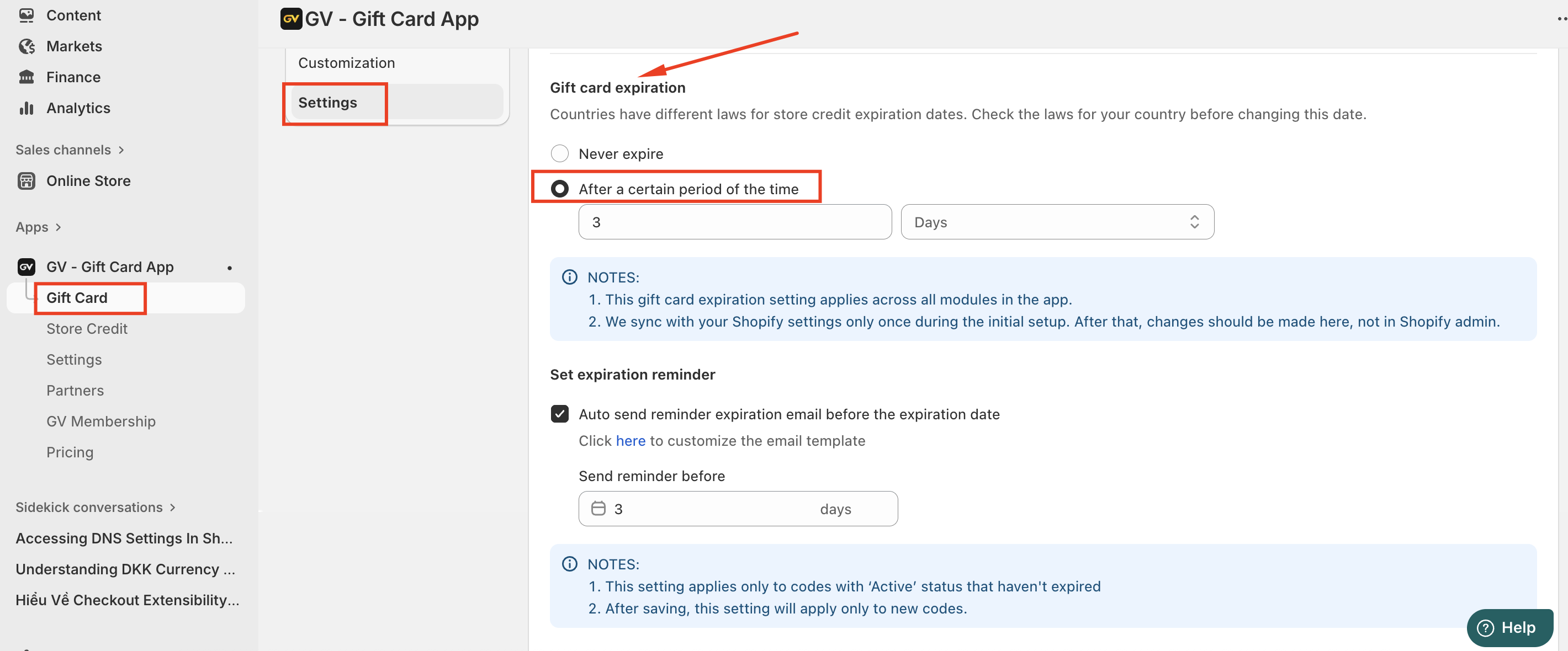
Step 4: Save your changes.
Important Notes
This setting applies only to gift cards with an Active status that have not yet expired.
After saving, the reminder email setting will apply only to newly generated gift card codes. Existing codes will not be affected.
Should you have any further concerns, please feel free to contact us via email at support@govalos.com
Was this article helpful?
That’s Great!
Thank you for your feedback
Sorry! We couldn't be helpful
Thank you for your feedback
Feedback sent
We appreciate your effort and will try to fix the article