Gift card expiration rules vary by country and region. Before changing your gift card expiration settings, we strongly recommend reviewing the applicable laws in your country to ensure compliance.
By default, gift cards are set to never expire. However, you can choose to define an expiration period if your business requires it.
How to Set a Gift Card Expiration Date
Follow the steps below to configure gift card expiration in the app:
Step 1: Go to Gift Card → Settings in the GV – Gift Card app.
Step 2: Enable the option “After a certain period of time.”
Step 3: Select your preferred expiration timeframe from the available options and save your changes.
Once enabled, newly issued gift cards will expire based on the selected timeframe.
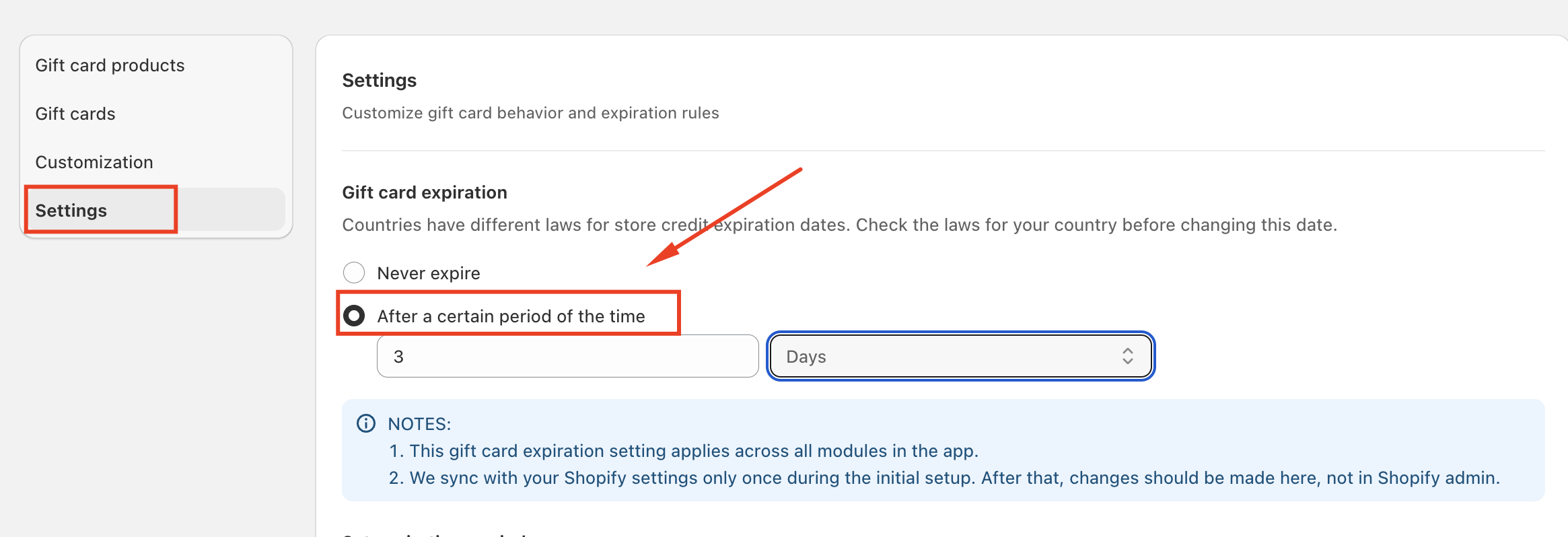
NOTES:
- This gift card expiration setting applies across all modules in the app.
- We sync with your Shopify settings only once during the initial setup. After that, changes should be made here, not in Shopify admin.
Should you have any further concerns, please feel free to contact us via email at support@govalos.com
Was this article helpful?
That’s Great!
Thank you for your feedback
Sorry! We couldn't be helpful
Thank you for your feedback
Feedback sent
We appreciate your effort and will try to fix the article