Yes, the app allows customers to customize the gift card amount instead of selecting only predefined denominations. This feature gives customers greater flexibility when purchasing gift cards.
How to Enable Custom Gift Card Amounts
To enable this option, follow the steps below:
Go to Gift Cards in the app
Select the current gift card product
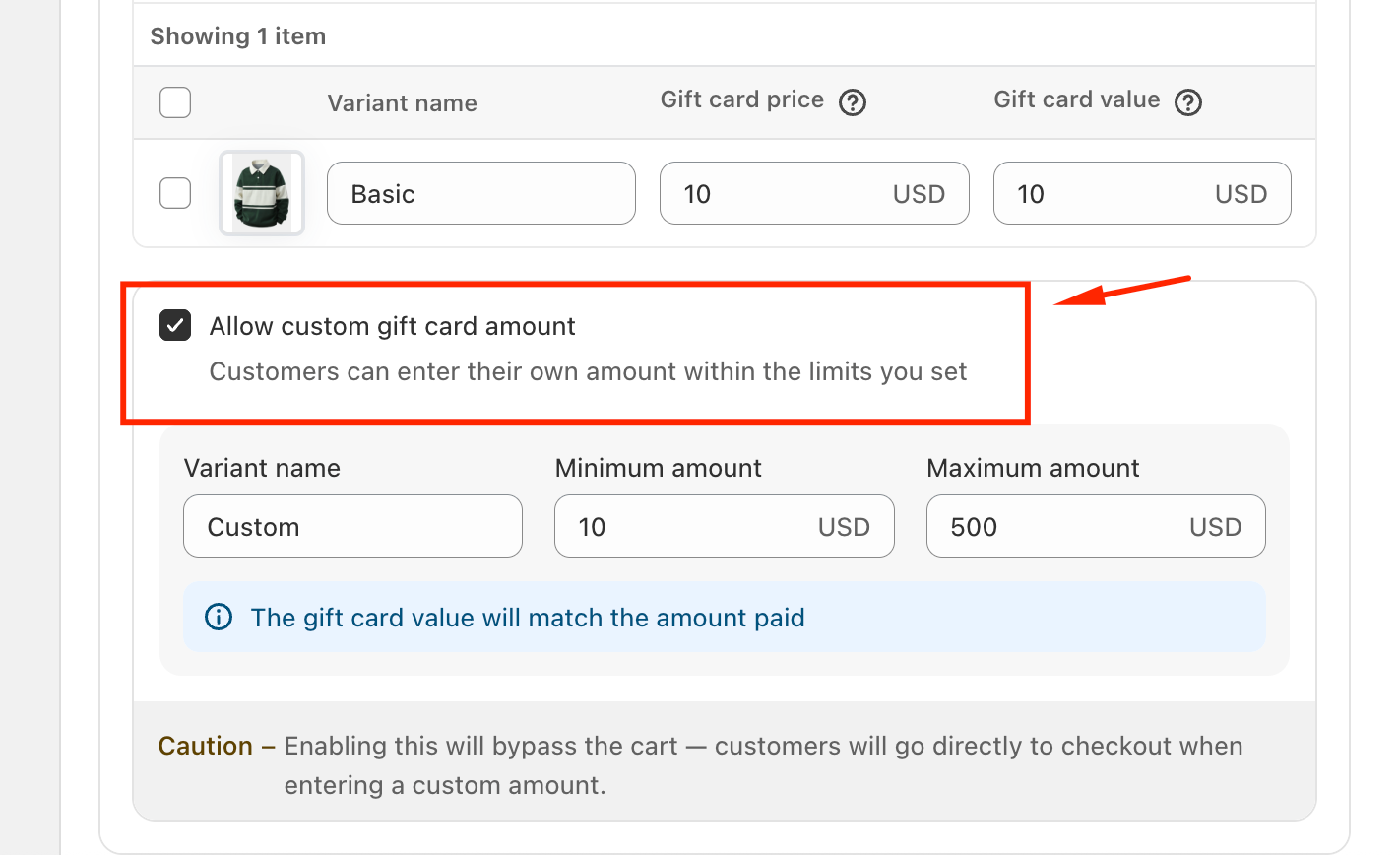
Enable the option “Allow custom gift card amount”
Once enabled, customers will be able to enter their own gift card value within the limits you define.
Important Notes
The maximum custom gift card amount must be less than 2,000 USD.
When this option is enabled, the cart will be bypassed. Customers will be redirected directly to checkout after entering a custom amount.
Allowing custom gift card amounts can improve the customer experience by offering more flexibility, but we recommend reviewing the checkout behavior to ensure it aligns with your store’s purchasing flow.
If you need any further information or assistance, please do not hesitate to contact us at support@govalos.com.
Was this article helpful?
That’s Great!
Thank you for your feedback
Sorry! We couldn't be helpful
Thank you for your feedback
Feedback sent
We appreciate your effort and will try to fix the article