In some cases, gift card emails may end up in a recipient’s spam or junk folder. This is due to how email providers filter incoming messages and is not specific to any single merchant.
Common Reasons This Can Happen
1. Shared Sending Address
By default, gift card emails are sent from a shared system email address (gifts@govalos.com), which is used by multiple merchants. Email providers evaluate overall activity on shared addresses, and this can occasionally affect how emails are filtered.
2. Email Provider Filtering
Email providers such as Gmail and Outlook use automated systems to decide whether emails are delivered to the inbox or spam folder. These filters can change over time and may route emails differently depending on recipient behavior.
3. Limited Brand Recognition
When emails are sent from a shared address, recipients may not immediately recognize the sender as your brand. Lower recognition can reduce engagement, which increases the likelihood of emails being filtered as spam.
Recommended Solution: Use a Custom Email Domain
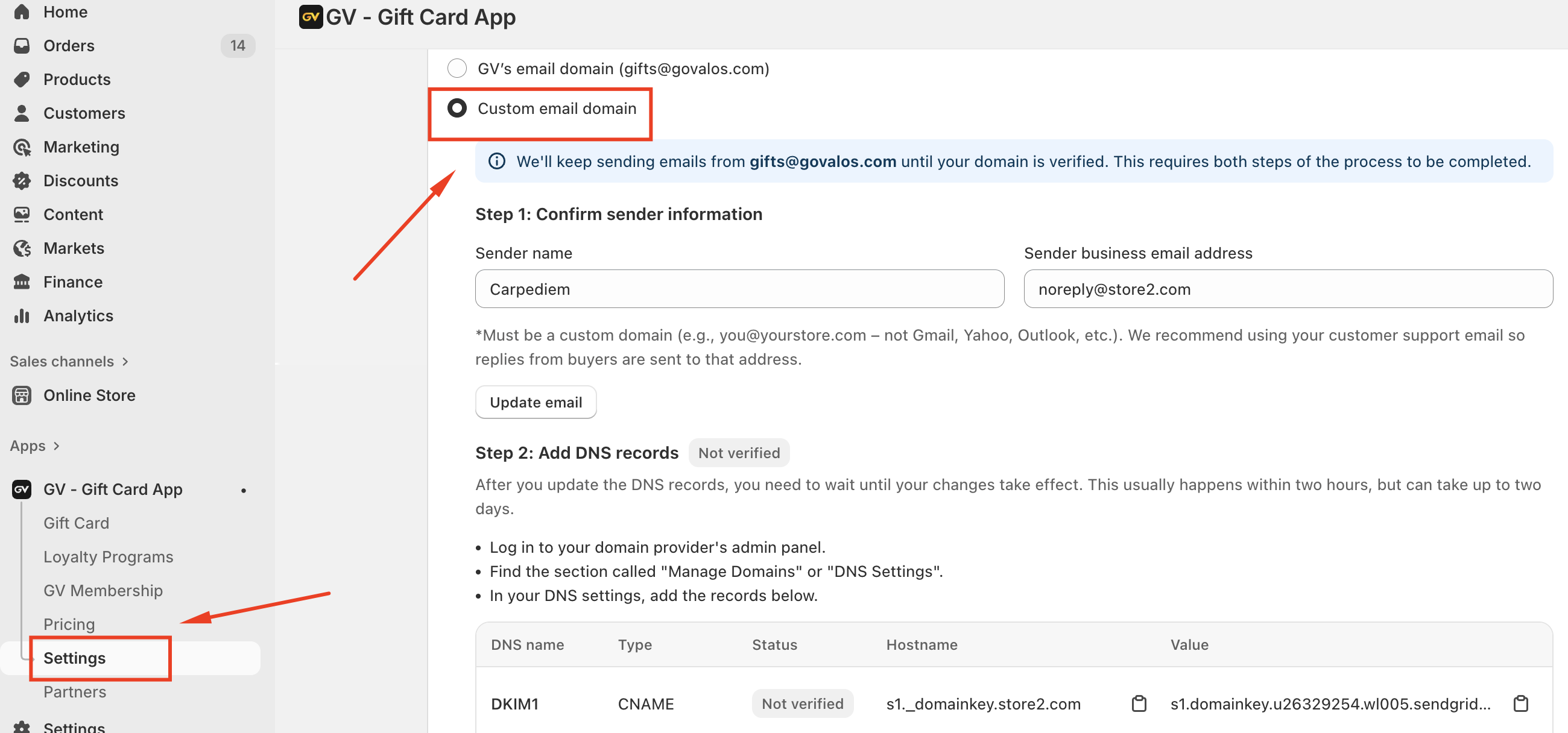
To ensure consistent delivery, we strongly recommend using a custom email domain. Sending gift card emails from your own branded email address improves recognition, engagement, and inbox placement, and significantly reduces the chance of emails being sent to spam.
How It Works
Once a custom email domain is enabled and verified in the app settings:
Gift card emails will be sent from your branded email address
SPF, DKIM, and domain authentication are applied
The shared domain (gifts@govalos.com) is no longer used for your store
Until verification is completed, emails will continue to be sent from the shared address to avoid service interruption.
Summary
Occasional spam filtering can occur due to shared sending addresses and email provider filtering rules. Using a custom email domain is the most effective way to ensure your gift card emails consistently reach your customers’ inboxes.
In case you have any further concerns, please feel free to drop us an email at support@govalos.com
Was this article helpful?
That’s Great!
Thank you for your feedback
Sorry! We couldn't be helpful
Thank you for your feedback
Feedback sent
We appreciate your effort and will try to fix the article