The Celebrate a Birthday feature allows merchants to reward customers with store credit on their birthday. This helps increase customer engagement, build loyalty, and encourage repeat purchases by offering a personalized reward on a special occasion.
⚠️ Note: This is a Premium feature and is not available for users on the Free plan.
How It Works
When this feature is enabled, customers who provide their birthday will automatically receive a reward credit on their birthday according to the settings configured by the merchant.
Merchants can customize:
The reward amount
Credit expiration
Birthday validation period
Optional credit note
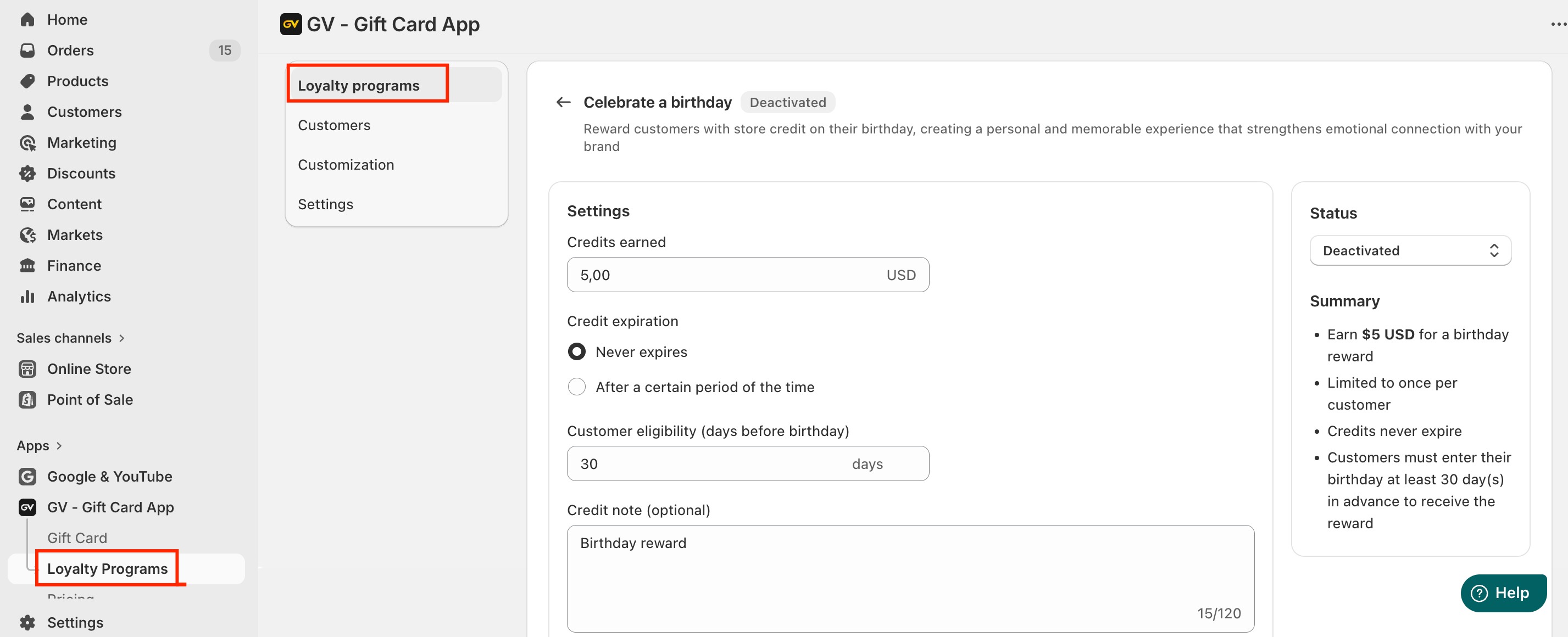
Enabling the Feature
To activate the birthday reward feature:
Go to In-app Settings
Navigate to Loyalty Program → Celebrate a Birthday
Toggle the feature to Activate
By default, this feature is disabled until manually activated.
Feature Settings
Once enabled, merchants can configure the following options.
1. Credit Earned
This setting determines the reward amount customers receive on their birthday.
Enter a fixed credit value based on your store currency.
Example: If you enter $5, customers will receive $5 store credit on their birthday.
Default value: $5
This reward is automatically issued when the customer's birthday arrives.
2. Credit Expiration
You can control how long the birthday credit remains valid.
Two options are available:
Never Expire (Default): The birthday reward credit will remain valid indefinitely until the customer uses it.
Expire After a Certain Period: You can define a specific expiration time after the credit is issued.
Examples:
7 days
30 days
3 months
1 year
Once the defined time passes, the credit will automatically expire.
3. Birthday Entry Validation Days
This setting prevents customers from entering their birthday right before the actual date just to immediately claim the reward.
Merchants can define how many days in advance customers must enter their birthday to qualify for the reward in the current year.
Example
Validation period: 30 days
Current date: November 28, 2025
Scenario 1
Customer enters birthday: November 30, 2025
Since the birthday is within the 30-day validation period, the customer will not receive the reward in 2025.
They will receive the reward on November 30, 2026 instead.
Scenario 2
Customer enters birthday: January 1, 2026
Since this date is outside the validation restriction, the customer will receive the reward normally on January 1, 2026.
Default validation period: 30 days
4. Credit Note (Optional)
Merchants can include an optional message that will be attached to the birthday reward credit.
Example messages:
“Happy Birthday! Enjoy this gift from us.”
“Celebrate your special day with this birthday reward.”
This message will appear along with the issued credit.
Summary
The Celebrate a Birthday feature allows merchants to automatically reward customers on their birthday with customizable store credit.
In case you have any further concerns, please feel free to drop us an email at support@govalos.com
Was this article helpful?
That’s Great!
Thank you for your feedback
Sorry! We couldn't be helpful
Thank you for your feedback
Feedback sent
We appreciate your effort and will try to fix the article